
Learning with AI has just got smarter than ever with the study mode in ChatGPT. This new feature works as a built-in guide that shows you how to learn subjects step by step rather than simply giving you the end answer. Whether you’re struggling through a difficult homework problem, studying for an exam, or delving into something new, study mode is here to help. Starting today, ChatGPT study mode is available to all logged-in users—whether you’re on the Free, Plus, Pro, or Team plans. In fact, the support for ChatGPT Edu is rolling out soon, too
Table of Contents
Why Study Mode Exists?
Millions of students already rely on ChatGPT AI to grasp difficult subject matter, study for exams, or simply get a handle on thick stuff. But there’s been an increasing question in educational circles: How do we ensure AI aids learning, rather than providing a shortcut path?
That’s where study mode in ChatGPT comes in. It’s created to make you think out loud about problems, think about what you’ve learned, and learn better. Instead of giving you the answer directly, it will tell “Let’s solve this together.’ In other words, you can say that an AI tutor has arrived.
What Makes Study Mode Special?
What distinguishes study mode in ChatGPT is that it’s founded on decades of education research. It was created with input from teachers, scientists, and learning specialists who know how actual learning occurs. What has been created is a mode centered on:
- Curiosity rather than cramming
- Reflection rather than memorization
- Comprehension rather than shortcuts
How Does Study Mode in ChatGPT Work?
Here’s what you can expect when you turn on study mode in ChatGPT:
Study mode will break down complex subjects into small chunks for you. It will help you to understand how one things relate to another, and all information will come in small sizes. This way, your mind can grasp it quickly.
Guided practice
Rather than reading answers, you’ll be prompted with leading questions, given hints, and asked to think about things. It’s like learning by conversation—but on your own terms.
Personalized to you
ChatGPT adapts to your answers, recalls from previous conversations, and assesses how confident you appear. It greets you where you are, whether you’re covering the fundamentals or going in-depth.
Frequent check-ins
You’ll discover mini-quizzes and open-ended questions to help you reinforce everything that you learnt. You’ll recognize when something clicks—and when it doesn’t yet.
On-demand flexibility
You can turn study mode on or off at any time. Need a fast answer? No problem. Want a slower walkthrough next time? Just toggle it back on.
What Students Are Saying?
During early testing, students told us that the study mode in ChatGPT made learning less stressful and more engaging. Here’s what a few of them had to say:
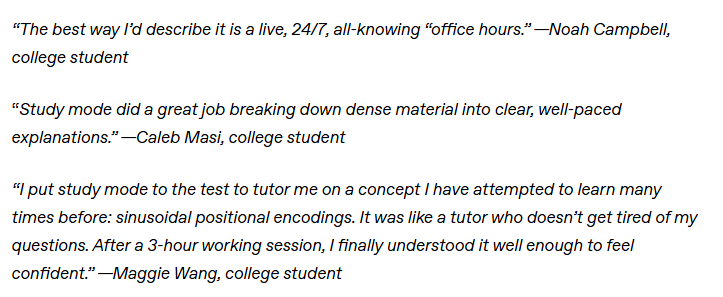
From Game Theory to Accounting to Bayesian Thinking to Discrete Math, students in the ChatGPT Lab have already applied study mode to master difficult topics—at their speed.
When to Use Study Mode?
Study mode in ChatGPT is ideal for:
- Getting through challenging assignments
- Preparing for exams by reviewing concepts
- Investigating new things you’re interested in
- Building decision-making and reasoning in everyday life
Imagine it as a thinking partner, making you more self-sufficient, not necessarily more effective
Built on Trust and Expertise
Study mode is not an add-on—it’s a mindset. Under the hood, it’s powered by system prompts informed by cognitive science research on learning, pedagogy, and human-centered design. These principles promote active learning, reflection, and intentional pacing—all methods that work to achieve deeper learning.
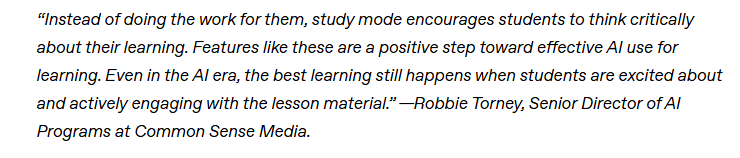
As OpenAI is further collaborating with Stanford’s SCALE initiative researchers and others, the intention is to turn AI into more than a tool—it must become a reliable partner in learning.
What’s Coming Next for Study Mode?
It’s just the start. Though study mode in ChatGPT is already powering robust learning experiences, OpenAI is set to include even more:
- Setting goals and tracking progress
- Visualizations to make difficult concepts easier to grasp
- Increased personalization from one session to another
OpenAI is also collecting data using long-term research so that they can know what enhances learning, and keep making the experience better based on actual students’ feedback.
Related informational articles
- What is 3 Parenting Styles and Dimensions Questionnaire (PSDQ)

- Most Cute & Unique Baby Names of the Year: International, Religious & Trendy Picks
- Easy Montessari Activities for 1-year-olds: How to turn your home into a learning space on a budget
- Tamagotchi Parenting: Nurturing Digital Companions in a Modern World




Ready to Give It a Shot?
It is simple to get started. Open ChatGPT, select “Study and learn” from the tools menu, and learn about any topic that interests you. Bring your question—just let ChatGPT guide you through something new. Whether you’re preparing for an exam, breaking down a textbook chapter, or just in pursuit of a hobby, study mode in ChatGPT is available to help you not only finish your work but also learn.
Frequently Asked Questions
What is Study Mode in ChatGPT?
Study Mode is a special feature in ChatGPT that transforms the AI from simply giving answers into a guided learning tool that helps you understand topics step by step, using questions, hints, and explanations like a virtual tutor.
How is Study Mode different from normal ChatGPT responses?
Unlike regular ChatGPT — which often provides direct answers — Study Mode encourages active learning by guiding you through concepts, asking follow-up questions, checking your understanding, and offering gradual explanations rather than instant solutions.
Can Study Mode replace a human tutor?
Study Mode isn’t a complete replacement for a human teacher, but it functions as a 24/7 interactive tutor, helping you practice problems, understand concepts, and improve critical thinking — often mimicking Socratic teaching.
Can I switch off Study Mode and get normal responses?
Absolutely. Study Mode can be turned on or off at any time. If you want a quick answer instead of a learning guide, simply toggle the mode back to default.
What kind of learning support does Study Mode provide?
Study Mode offers:
✔ Guided, step-by-step explanations
✔ Socratic questioning to deepen understanding
✔ Personalized feedback based on your responses
✔ Mini-quizzes and knowledge checks
✔ Tailored pacing for beginners or advanced learners
These features turn ChatGPT into an interactive learning partner.
“If you found this article helpful, share it with your circle and follow PingShopping on social media”