
Learn how to use ChatGPT to write faster, brainstorm better, and get more done at work. Unlock your team’s productivity in 2025.
With 800 million weekly active users and 92% of Fortune 500 companies now using ChatGPT, this AI-powered tool has evolved from a novelty into a workplace necessity. Whether you’re a marketer brainstorming campaign ideas, a freelancer drafting client proposals, or a corporate employee managing complex projects, ChatGPT can transform the way you work—making you faster, sharper, and more creative.
What ChatGPT Is (2025 Update)
ChatGPT is an advanced artificial intelligence language model developed by OpenAI that understands and generates text that resembles human language. Think of it as a highly knowledgeable assistant that can write, analyze, brainstorm, code, summarize, and problem-solve across virtually any topic or industry. Unlike traditional software that follows rigid commands, ChatGPT employs natural language processing to comprehend context and provide responses that feel genuinely conversational.
In 2025, ChatGPT will have become significantly more powerful with continuous improvements in accuracy, reasoning, and real-time information access. The platform now offers enhanced features, including document analysis, code generation, multilingual support, and integration with workplace tools. What makes it particularly valuable for professionals is its ability to adapt to different writing styles, understand industry-specific jargon, and provide personalized assistance based on your unique needs.
Why ChatGPT Is a Game-Changer for Workplace Productivity
The numbers tell a compelling story. Recent research shows that 78% of organizations reported using AI in 2024, up from 55% the previous year, and this adoption continues to accelerate. But what’s driving this explosive growth? The answer lies in measurable, transformative productivity gains that are reshaping how work gets done.
Studies from Harvard, MIT, and BCG found that consultants using ChatGPT finished tasks up to 25% faster than those without AI assistance, while some reports indicate task completion times can be cut by as much as 56%. Business professionals using ChatGPT complete 59% more documents in a workday, transforming what used to take 27 minutes into just 17 minutes. Support agents handle 13.8% more customer inquiries per hour, while programmers using AI tools complete 126% more coding projects weekly.
Perhaps most remarkably, 36% of workers now use ChatGPT at least monthly for work tasks, with 22% using it daily. Among professional developers, 51% use AI tools daily in their development process. The technology has become particularly dominant in specific industries, with 65% of marketers, 64% of journalists, and 63% of developers reporting regular ChatGPT usage.
The financial impact is equally impressive. A quarter of American companies have saved between $50,000 and $70,000 using AI tools, with 11% saving over $100,000. Companies investing in AI are seeing revenue growth of 3-15%, while customer service productivity could increase by 30-45%.
10 Smart Ways to Use ChatGPT at Work
Writing and Editing Reports
Creating professional reports no longer requires hours of staring at a blank page. ChatGPT excels at transforming rough notes and bullet points into polished, well-structured documents. You can provide the AI with key data points, outline your main arguments, and specify your desired tone—whether formal for board presentations or conversational for internal team updates.
The tool can help you craft executive summaries, develop comprehensive analysis sections, and ensure your writing maintains consistency throughout lengthy documents. Business professionals report that ChatGPT has fundamentally changed how they allocate their time: less than half the time is spent generating rough drafts, and double the time is available for polishing and refining the final product. This shift means higher-quality outputs delivered faster.
For best results, start by feeding ChatGPT your report’s purpose, target audience, and key messages. Ask it to create an outline first, then develop each section systematically. Remember to review and fact-check all AI-generated content, adding your personal insights and company-specific context that only you can provide.
Email Drafting
Email consumes a staggering amount of professional time—research shows AI integration reduced email time by approximately 25%, saving roughly 3 hours per week. ChatGPT transforms email writing from a time-consuming chore into a streamlined process.
Whether you need to schedule a meeting, follow up with a client, respond to a complaint, or craft a delicate message about organizational changes, ChatGPT can generate appropriate drafts in seconds. The tool understands professional email conventions and can adjust tone based on your relationship with the recipient—formal for executives, friendly for colleagues, or empathetic for customers experiencing issues.
Using the C.R.E.A.T.E. Framework helps maximize results: provide Context about the situation, define your Role and relationship to the recipient, specify your Expectation for the email’s outcome, adjust the Tone appropriately, and review the Example output before sending. You can even ask ChatGPT to generate multiple subject line variations and test different call-to-action approaches for important messages.
Brainstorming Ideas
Creative blocks cost professionals valuable time and mental energy. ChatGPT serves as an always-available brainstorming partner that can generate diverse perspectives and fresh angles on any challenge. The AI draws from vast training data spanning essentially the entire internet, offering alternative viewpoints that can spark genuine innovation.
When brainstorming with ChatGPT, context is everything. Rather than asking vague questions like “give me marketing ideas,” provide specific details about your target audience, constraints, goals, and brand personality. You can use traditional brainstorming techniques enhanced by AI—word association games, visual prompts, role-playing exercises, and boundary-setting challenges.
For example, marketing professionals using ChatGPT report generating 10-15 testable concepts per sprint compared to just 3-5 previously, with ideation cycles compressing from 4-6 hours to 1-2 hours. The tool excels at producing rapid idea variations, combining unexpected concepts, and suggesting approaches you might not have considered. Ask it to give you ten ideas, then request five more similar to your favorite option, or have it tailor suggestions to different audience segments.
Summarizing Documents
Information overload is a universal workplace challenge. ChatGPT can digest lengthy articles, research papers, meeting transcripts, and complex documents, extracting key insights in minutes rather than hours. This capability is invaluable for professionals who need to stay informed across multiple projects without drowning in documentation.
The summarization process is straightforward: paste the URL of an online article or copy the full text directly into ChatGPT, then specify your desired summary length and focus. You can request executive summaries for leadership, technical summaries for specialists, or simplified explanations for non-expert audiences. The tool can identify main arguments, extract action items, highlight key data points, and even compare multiple documents to spot patterns and contradictions.
For maximum effectiveness, tell ChatGPT exactly how long the summary should be and what aspects matter most. Need a 150-word overview? Want the summary formatted as bullet points? Looking for key takeaways with supporting evidence? Simply specify your requirements, and the AI will deliver accordingly.
Also Read
Project Planning and Task Management
Managing complex projects involves juggling timelines, resources, dependencies, and stakeholder expectations. ChatGPT can streamline this entire process by generating detailed project plans, breaking down large initiatives into manageable tasks, and creating structured timelines with clear milestones.
Studies show that AI-powered project management tools accelerate schedules by 11% on average, with manual planning time reduced by 95% through automated scheduling and milestone creation. ChatGPT can develop Gantt chart structures, identify task dependencies, allocate resources by project phase, and suggest risk mitigation strategies.
You can prompt ChatGPT to act as a project manager: “Create a detailed project timeline for a software development project, breaking it down into key phases (planning, execution, testing, delivery) and assigning estimated durations to each task”. The AI will generate structured tables showing task names, start dates, end dates, and responsible teams—ready to import into your project management software.
Beyond initial planning, ChatGPT assists with ongoing project coordination by generating team meeting agendas, summarizing meeting minutes, tracking action items with deadlines, and creating stakeholder update communications. This comprehensive support allows project managers to focus on strategic decision-making rather than administrative documentation.
Customer Support Automation
Customer service teams face relentless pressure to respond faster while maintaining quality. ChatGPT-powered automation delivers 24/7 customer support, handling inquiries instantly even outside business hours. This capability is especially valuable for businesses operating across time zones or in industries where customers expect immediate responses.
When integrated into customer service systems, ChatGPT can answer frequently asked questions, track orders, process return requests, troubleshoot common issues, and provide personalized product recommendations. Research shows that generative AI assistants help customer support agents resolve 15% more issues per hour, while business professionals using AI complete 66% more realistic tasks.
The key is making ChatGPT an expert in your specific products and services. Upload your knowledge base documentation, train the AI on common customer scenarios, and establish clear protocols for when to escalate issues to human agents. ChatGPT can also assist agents internally by suggesting empathetic response templates, summarizing long customer conversation histories, and providing quick access to relevant policy information—reducing agent workload while improving customer satisfaction.
Creating Marketing Copy
Important Links:
If you are looking for the World’s Greatest Wealth Books Help You Earn 1 Cent Per Second
Marketing teams constantly need fresh content—ad copy, social media posts, email campaigns, landing pages, and product descriptions. ChatGPT accelerates this content creation process while maintaining persuasive quality. 65% of marketers report regular ChatGPT usage, making it the profession with the highest AI adoption rate.
The tool can generate headline variations, craft compelling calls-to-action, write SEO-optimized content, and adapt messaging for different audience segments. Marketing professionals using AI report saving significant time per content piece while increasing their testable concept volume substantially. One fitness brand automated social media content generation with ChatGPT and saw increased audience engagement and follower growth, freeing their marketing team to focus on strategy.
Effective marketing copy creation starts with clear frameworks. Use proven structures like AIDA (Attention-Interest-Desire-Action), PAS (Problem-Agitate-Solution), or PASTOR to guide ChatGPT’s output. Provide specific details about your target audience, unique selling points, brand voice, and desired action. Then refine the AI-generated drafts to align perfectly with your brand personality and strategic goals.
Remember that ChatGPT provides strong starting points, not finished products. The most successful marketers use AI to overcome blank-page syndrome and generate rapid variations, then apply their expertise to polish and personalize the final content.
Research Assistance
Research is fundamental to knowledge work but notoriously time-consuming. ChatGPT revolutionizes this process by rapidly summarizing literature, suggesting research methodologies, generating hypotheses, and synthesizing information from multiple sources. The tool can explain complex concepts in an accessible language, making it easier to collaborate across disciplines and communicate findings to non-specialist stakeholders.
Researchers using ChatGPT report completing time-consuming tasks like literature reviews and research drafts much faster than traditional methods. The AI can help refine research questions, design surveys, analyze user research data, and even suggest promising areas for future exploration based on emerging trends.
For professionals conducting market research, competitive analysis, or industry trend monitoring, ChatGPT serves as an efficient starting point. Ask it to provide overviews of specific topics, compare different approaches or solutions, identify key players in a market, or synthesize recent developments in your field. Always verify AI-generated information against authoritative sources, but use ChatGPT to dramatically reduce the time spent on initial research and information gathering.
Coding Help and Data Analysis
Software development has been transformed by AI assistance. 84% of professional developers are using or planning to use AI tools in their development process, with 51% using AI daily. Programmers using AI-powered tools complete 126% more projects weekly—a staggering productivity boost.
ChatGPT excels at generating code snippets, explaining complex code logic, debugging errors, optimizing algorithms, and creating technical documentation. Developers can describe functionality in plain language, and ChatGPT will generate appropriate code across multiple programming languages. The tool can refactor existing code for better efficiency, suggest alternative implementations, and automatically generate comments and documentation that make code more maintainable.
Beyond coding, ChatGPT assists with data analysis by writing scripts for data processing, explaining statistical concepts, suggesting visualization approaches, and interpreting results. Financial professionals using AI for report generation and investment analysis report time savings and improved accuracy, with 72% of companies piloting or using AI for financial analysis.
However, developers should always review and test AI-generated code thoroughly. ChatGPT is best used for handling boilerplate code, providing starting templates, and offering suggestions—not as a replacement for professional software engineering expertise.
Learning and Upskilling
Professional development requires continuous learning, but finding time for upskilling is challenging. ChatGPT provides 24/7 on-demand learning support, acting as a personalized tutor available whenever you need guidance. The tool can explain new concepts, recommend training resources, answer questions about unfamiliar topics, and provide practical advice for skill development.
Organizations using ChatGPT for employee training report enhanced effectiveness through personalized learning experiences tailored to individual skill gaps. The AI can assess knowledge levels, recommend relevant training materials, provide real-time feedback, and offer virtual mentorship that simulates interactions with experienced colleagues. Corporate training has grown into a $340 billion market, and ChatGPT is revolutionizing how companies approach employee development.
For self-directed learning, ChatGPT can create customized study plans, generate practice exercises, explain difficult concepts in multiple ways until understanding clicks, and track your progress over time. Whether you’re learning a new programming language, developing leadership skills, or staying current with industry trends, ChatGPT provides accessible, interactive learning support that adapts to your pace and learning style.
Research shows that 22% of AI-driven productivity improvements come from self-guided upskilling, while another 22% stems from employer-provided AI training. Investing time in learning how to effectively use AI tools like ChatGPT has become a valuable career skill in itself, with 90% of business leaders viewing ChatGPT experience as valuable for job seekers.
Productivity Improvement Data
Research demonstrates significant productivity gains across different workplace tasks when using ChatGPT. The following chart illustrates measurable improvements:
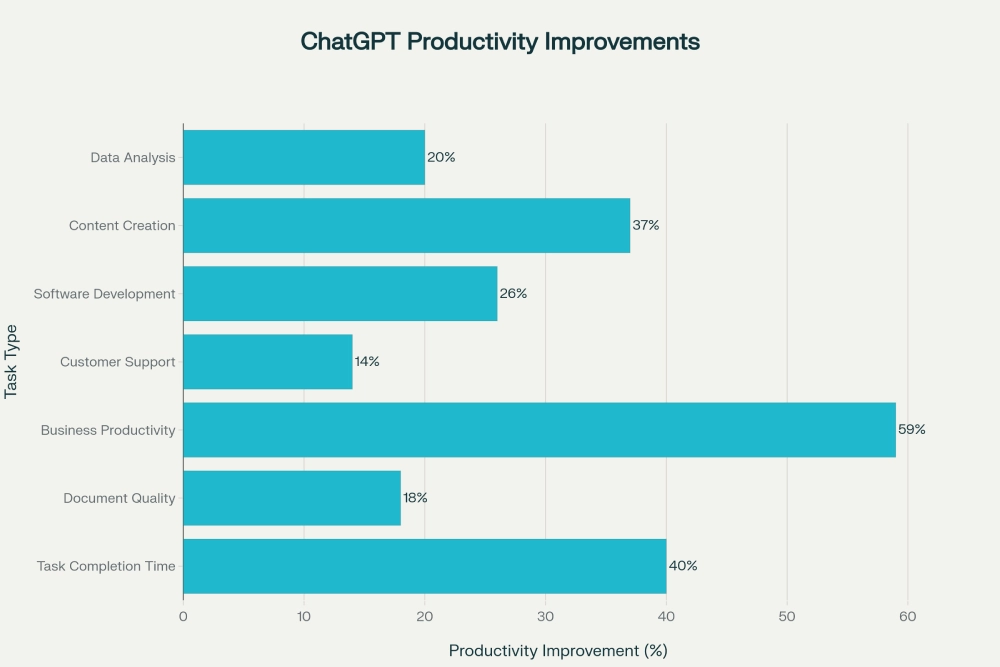
The data reveals that business productivity sees the highest gains at 59%, meaning professionals can produce substantially more work in the same timeframe. Task completion time improves by 40%, with workers finishing assignments in 17 minutes instead of 27 minutes. Content creation shows 37% improvement, while software development productivity increases by 26%, indicating a substantial impact on coding efficiency.
Industry adoption rates also vary significantly, with certain sectors leading AI implementation:
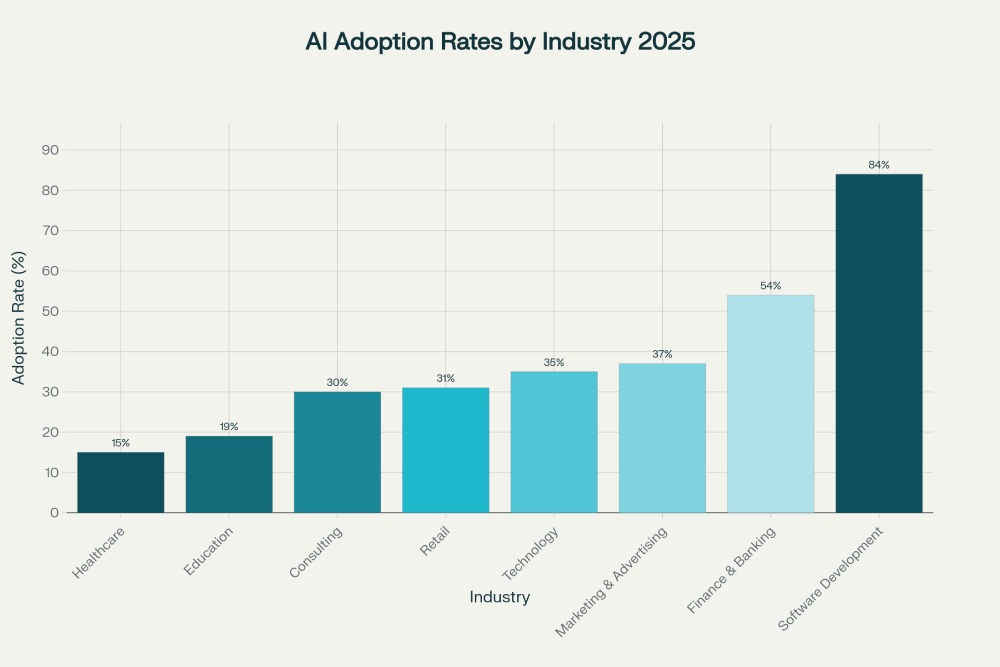
Software development leads all industries at 84% adoption, followed by finance and banking at 54%. Marketing and advertising professionals show 37% adoption-the highest among non-technical fields. These adoption patterns reflect both the maturity of AI tools for different use cases and the varying levels of organizational readiness across sectors.
Case Study: How One Marketing Team Increased Productivity by 40% Using ChatGPT
A mid-sized B2B SaaS marketing team of 15 professionals faced a common challenge: they needed to increase creative output without sacrificing brand quality or burning out their staff. The team covered brand management, demand generation, content marketing, and lifecycle campaigns—all areas requiring constant content creation and strategic thinking.
Before implementing ChatGPT, the team’s workflow was bottlenecked by time-intensive ideation sessions. They spent 4-6 hours per campaign on brainstorming alone, produced only 3-5 testable concepts per sprint, and struggled with inconsistent brand voice across multiple creators. Team members spent approximately 25% of their time brainstorming, 50% writing rough drafts, and 25% editing—leaving little capacity for strategic optimization or experimentation.
The team adopted a structured ChatGPT implementation approach focused on four key areas: morning ideation sessions using the AI to generate campaign angles and content concepts; rapid validation through prebuilt prompt templates and brand voice checklists; execution measurement by moving selected concepts to their task tracker with defined KPIs; and continuous refinement based on performance data.
Within eight weeks, the results were dramatic. Ideation cycles compressed from 4-6 hours to 1-2 hours—a time savings of up to 66%. The team’s testable concept volume increased from 3-5 to 10-15 per sprint, enabling far more experimentation and optimization. Most impressively, first-week click-through rates on test campaigns improved by double digits, demonstrating that increased quantity didn’t compromise quality.
The time allocation shift proved transformative. The hours saved on initial draft creation were redirected to strategic work—analyzing performance data, refining targeting, and conducting deeper competitive research. Reporting time dropped from 2-3 hours to under an hour by combining ChatGPT-generated briefs with structured documentation. Team members reported higher job satisfaction and reduced creative burnout, as they spent more time on strategic, high-value activities rather than grinding through repetitive content generation.
This case study aligns with broader industry findings showing that workers collaborating with AI report 81% higher job satisfaction and that marketing teams using AI tools see substantial time savings and creative output improvements. The key success factors included establishing clear brand guidelines for AI outputs, maintaining human oversight and editing, starting with low-risk content types before expanding to higher-stakes materials, and continuously measuring results to refine the approach.
Ethical Use and Limitations
While ChatGPT offers tremendous benefits, responsible implementation requires understanding its limitations and potential risks. The technology is not infallible and should be used thoughtfully within appropriate guardrails.
Data Privacy and Confidentiality: Never input confidential information, proprietary data, trade secrets, or personally identifiable information into ChatGPT unless using enterprise versions with specific data protection agreements. Information shared with AI tools may be used for training purposes, potentially exposing sensitive company information. Many organizations now have formal policies restricting what can and cannot be shared with AI assistants.
Accuracy and Fact-Checking: ChatGPT can generate plausible-sounding but incorrect information—a phenomenon known as “hallucination”. Always verify factual claims, statistics, and specialized information against authoritative sources. This is especially critical for industries with low fault tolerance, like healthcare, legal services, or financial advising. The AI should be viewed as a starting point for content creation, not an authoritative source of truth.
Bias and Fairness: AI systems can reflect biases present in their training data, potentially leading to discriminatory outputs in hiring decisions, customer interactions, or content creation. Organizations should regularly audit AI-generated content for bias, establish diverse oversight committees, and maintain human judgment for sensitive decisions. 47% of employees fear AI may replace their jobs, highlighting the importance of positioning AI as an augmentation tool rather than a replacement.
Transparency and Attribution: Be transparent about AI-assisted work when appropriate. Some contexts require disclosure of AI usage—academic settings often have policies about AI-generated content, and certain professional contexts expect human-created work. Clear guidelines help employees understand when and how AI assistance is acceptable.
Skill Development Concerns: Over-reliance on AI tools could potentially hinder skill development if professionals use them as substitutes for learning rather than learning aids. Organizations should balance AI efficiency gains with continued investment in human capability development, critical thinking, and creative problem-solving.
Responsible Implementation: Leading organizations establish clear governance frameworks, including acceptable use policies, data handling protocols, regular audits, employee training programs, and escalation procedures for ethical concerns. They position AI as augmenting human capabilities rather than replacing workers, invest in change management to address employee concerns, and create feedback channels where staff can report issues or misuse.
The most successful AI implementations view technology as enabling humans to focus on higher-value work—strategic thinking, relationship building, creative innovation, and complex problem-solving that requires emotional intelligence and contextual understanding. When implemented responsibly with appropriate oversight, ChatGPT becomes a powerful productivity multiplier rather than a problematic replacement.
Also Read
Conclusion
ChatGPT has evolved from experimental technology to an essential workplace tool in a remarkably short time. With 800 million weekly users, 92% Fortune 500 adoption, and documented productivity improvements ranging from 14% to 59% across various tasks, the evidence is clear: AI assistance is reshaping professional work.
The most important insight is that ChatGPT works best as an AI co-worker, not a replacement. It excels at handling time-consuming tasks—drafting initial content, summarizing information, generating ideas, writing code snippets, and answering routine questions. This frees humans to focus on what we do best: strategic thinking, creative innovation, relationship building, ethical judgment, and complex problem-solving that requires emotional intelligence and deep contextual understanding.
The professionals seeing the greatest benefits aren’t simply using ChatGPT as a productivity hack. They’re thoughtfully integrating AI into their workflows with clear processes, maintaining quality through human oversight, continuously learning to use the tools more effectively, and staying mindful of ethical considerations and limitations.
As AI capabilities continue advancing rapidly, the workplace divide won’t be between humans and machines—it will be between professionals who effectively leverage AI tools and those who don’t. The technology is accessible, often free or low-cost, and requires no special technical skills beyond learning effective prompting techniques.
Start using ChatGPT today and let it do the heavy lifting. Begin with low-stakes tasks like drafting emails or brainstorming ideas. Experiment with different prompts to discover what works best for your specific role and industry. Share successful approaches with your team. Establish clear guidelines for responsible use. Track your time savings and productivity improvements. Most importantly, redirect the hours you save toward strategic, creative, and relationship-focused work that truly requires your unique human expertise.
The future of work isn’t about choosing between human intelligence and artificial intelligence—it’s about combining both to achieve results neither could accomplish alone. ChatGPT is your opportunity to multiply your impact, accelerate your output, and focus your energy on the work that matters most. The only question is: are you ready to embrace your new AI co-worker?
“If you found this article helpful, share it with your circle and follow PingShopping on social media”
Can I use ChatGPT to increase my work productivity?
Yes sure. You can boost your work productivity by using ChatGPT.
Can I use ChatGPT for project planning and task management?
Yes, you can prompt ChatGPT to act as a project manager for project planning and task management. ChatGPT can streamline this entire process by generating detailed project plans, breaking down large initiatives into manageable tasks, and creating structured timelines with clear milestones.
Can I use ChatGPT for Email Drafting ?
Yes, you can use ChatGPT for generating appropriate drafts in seconds. Also, when you need to schedule a meeting, follow up with a client, respond to a complaint, or craft a delicate message about organizational change.
Can I also use ChatGPT for data analysis?
Yes, ChatGPT assists with data analysis by writing scripts for data processing, explaining statistical concepts, suggesting visualization approaches, and interpreting results.